AI Agent กับ MCP
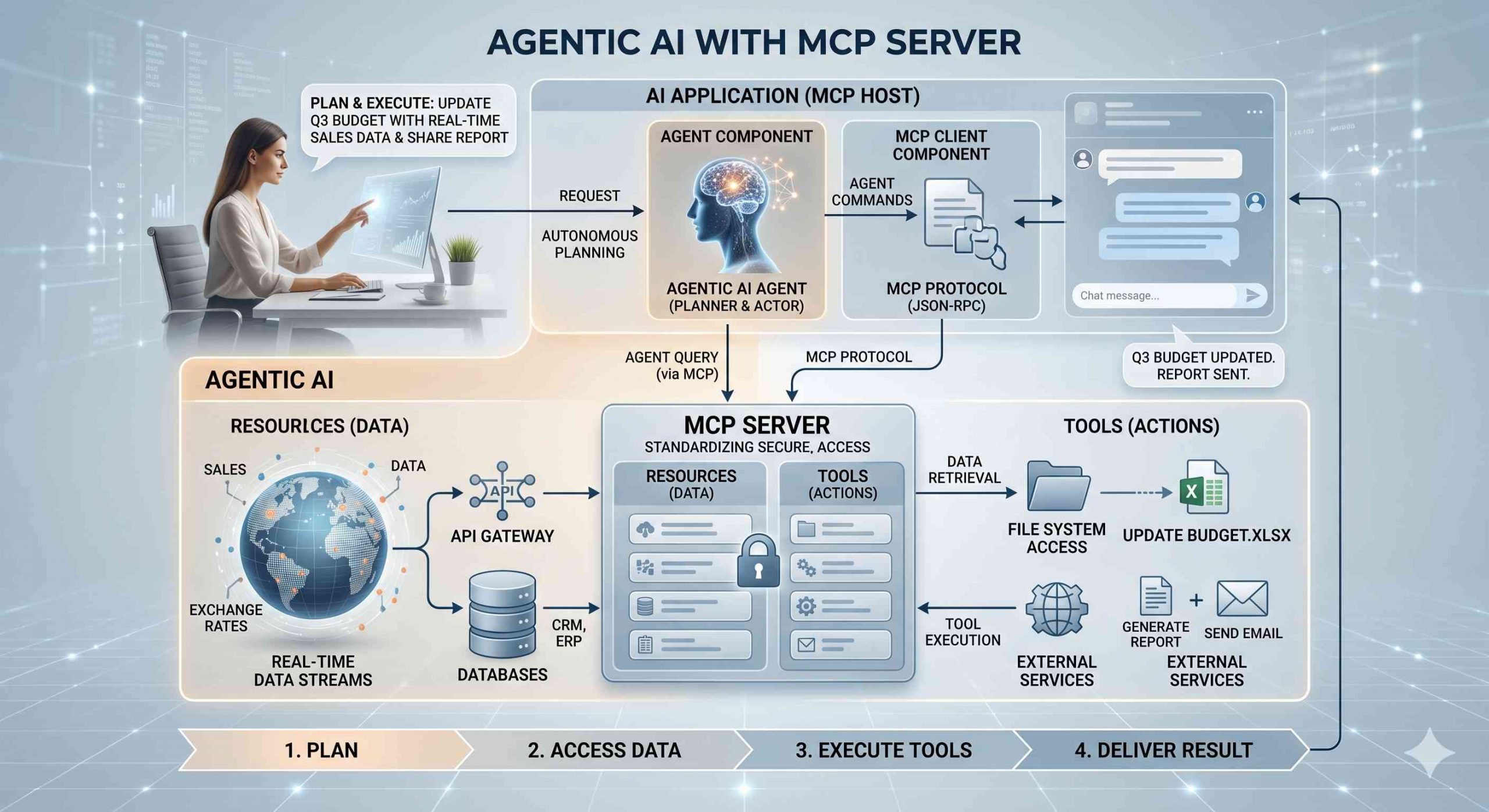
จากบทความที่แล้วเราได้ลองสร้าง Agentic สำหรับดึงข้อมูลใบเสนอราคา สต็อกสินค้า จาก PDF และแปลงเป็น Excel แบบอัตโนมัติกันแล้วนั้น เราจะมาทำกันต่อโดยการเพิ่ม Tools ใหม่ ๆ ให้มันนำ MCP มาครอบตัว AI Agent ของเราเพื่อให้สามารถต่อยอดเป็นระบบ Multi-Agent หรือจัดการ Tools ที่มีเยอะมากขึ้นได้ สำหรับบทความที่เกี่ยวข้องอ่านได้ที่นี่ AI Agents สร้างยังไง และ Model Context Protocol คืออะไร
AI Agent Project Structure
เพื่อให้ทุก ๆ โปรเจคมีความเป็นระเบียบเรียบร้อยสิ่งที่ควรทำคือการวางโครงสร้างของโปรเจคก่อน ประโยชน์ของการวางโครงสร้างคือช่วยให้เราสามารถที่จะเข้ามาจัดการแก้ไขโค้ดส่วนต่าง ๆ ได้อย่างมีประสิทธิภาพ ไม่ส่งผลกระทบต่อกันหากแก้อันใดอันนึง และป้องกันความผิดพลาดจากการแก้ไขในจุดที่ไม่เกี่ยวข้องได้ รวมถึงการทำให้โปรเจคของเราอ่านทำความเข้าใจได้ง่ายด้วย สำหรับ Agentic App ที่ใช้ MCP เราจะมีโครงสร้างคือ
mcp_document_agents/
├── .env
├── agent.py
├── agent_output.txt
├── server.py
├── test_mcp.py
├── data_models/
│   └── schemas.py
├── documents/
│   ├── Inventory Report/
│   │   ├── monthly/
│   │   │   └── monthly/
│   │   │       └── (23 files: StockReport_2016-07.pdf to StockReport_2018-05.pdf)
│   │   └── monthly-Category/
│   │       └── monthly-Category/
│   │           └── (184 files: StockReport_2016-07_1.pdf to StockReport_2018-05_8.pdf)
│   ├── PurchaseOrders/
│   │   └── (830 files: purchase_orders_10248.pdf to purchase_orders_11077.pdf)
│   ├── Shipping orders/
│   │   └── (809 files: order_10248.pdf to order_11069.pdf)
│   └── invoices/
│       └── (830 files: invoice_10248.pdf to invoice_11077.pdf)
├── llm/
│   └── models.py
├── notebooks/
│   └── testAndDebug.ipynb
├── output/
│   ├── inventory_report_2017.csv
│   ├── inventory_sales_analysis_2017.md
│   └── invoices_10248_10250.csv
└── tools/
    ├── content_parser.py
    ├── data_analysis.py
    ├── file_reader.py
    └── file_search.py
- ด้านนอกสุดจะเก็บไฟล์หลักสำหรับ Client และ Server ของ MCP ไว้ โดยที่ Client ก็คือตัว Agent ของเรา (agent.py) และ Tools, Resources, Prompts จะอยู่ใน Server โดยการเชื่อมต่อกันระหว่าง Client กับ Server จะเป็นแบบ 1 ต่อ 1 ไม่ปะปนกัน ซึ่ง Server 1 ตัวสามารถที่จะต่อกับ Client ได้หลายตัว
- tools จะทำหน้าที่เก็บฟังก์ชันสำหรับทำงานต่าง ๆ ตามที่เรากำหนด (จริง ๆ ตัวที่เป็น Resources สำหรับ LLM ควรจะแยกไว้อีกโฟลเดอร์)
- llm จะเก็บทุกอย่างสำหรับการเรียกใช้งานโมเดล จัดการโมเดล
- documents สำหรับเก็บข้อมูลที่เราจะให้ Agent ค้นหาและหยิบไปใช้งานง่าย ๆ
- data_models สำหรับเก็บ Schema ของข้อมูลที่ต้องรับส่งในระบบ Agent โดยจะครอบด้วย Pydantic
- output สำหรับบันทึกผลลัพธ์ที่ต้องการจาก Agent
Tools for AI Agent
Tools จริง ๆ แล้วก็คือฟังก์ชันสำหรับทำหน้าที่หนึ่งอย่างเฉพาะทาง เป็นฟังก์ชันปกติไม่มีอะไรแปลกพิสดารแต่อย่างใด สิ่งที่จะต้องละเอียดหน่อยหลัก ๆ จะเป็น Docstring เพราะเป็นสิ่งที่ Agent ต้องอ่าน และ Type Hints เพื่อให้ Agent คืนค่าได้ถูกต้องรวมถึงทำให้ระบบทำงานได้เร็วขึ้นด้วย Tools ที่เราสร้างจะดังนี้
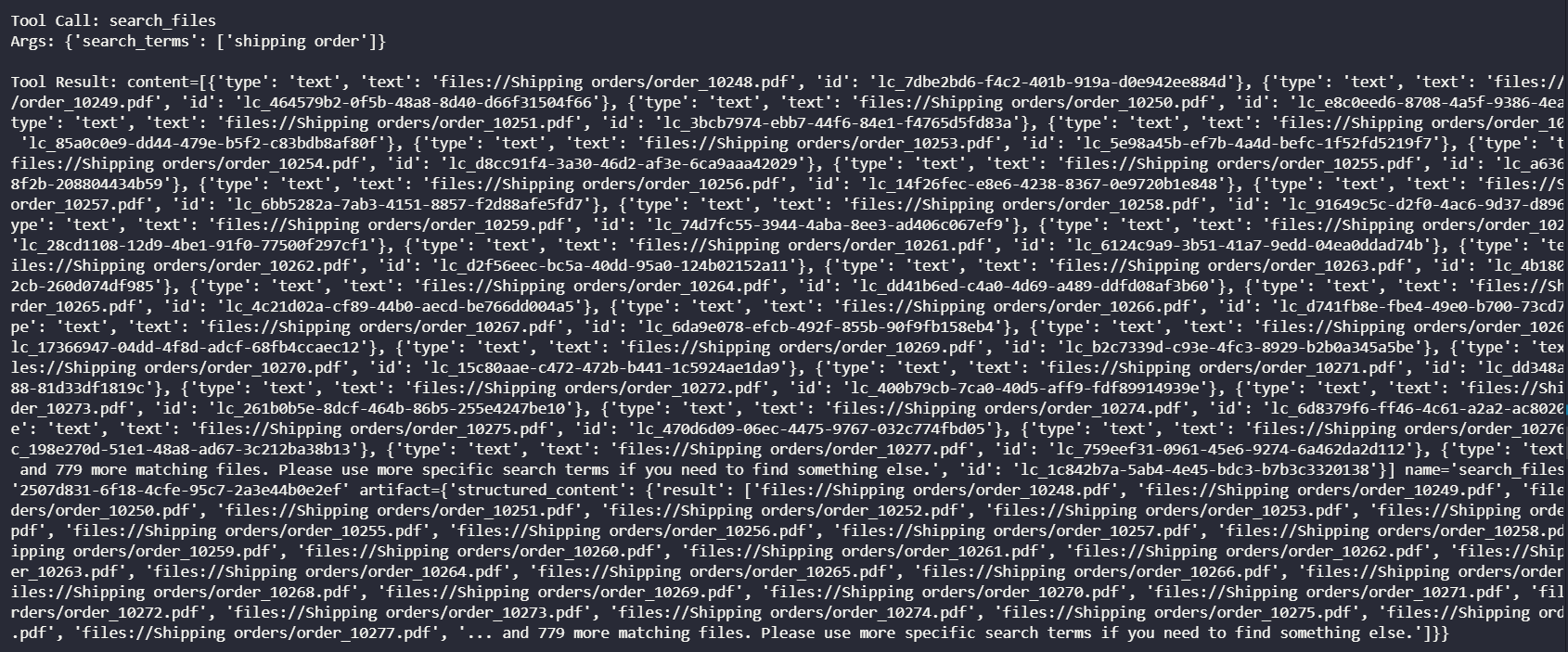
- search_files ฟังก์ชันสำหรับทำหน้าที่ค้นหาไฟล์ตามที่ผู้ใช้งานระบุเข้ามา โดยเราจะหาจากคำที่ผู้ใช้งานระบุ เครื่องมือจะทำ Partial Search แบบง่าย ๆ กับข้อมูลทั้งหมดที่มีใน Sub Folder ซึ่ง Agent สามารถที่จะคิด Terms ในการค้นหาด้วยตัวเองได้ วิธีนี้จะทำให้ผู้ใช้ไม่จำกัดวิธีค้นหาไฟล์มากนัก
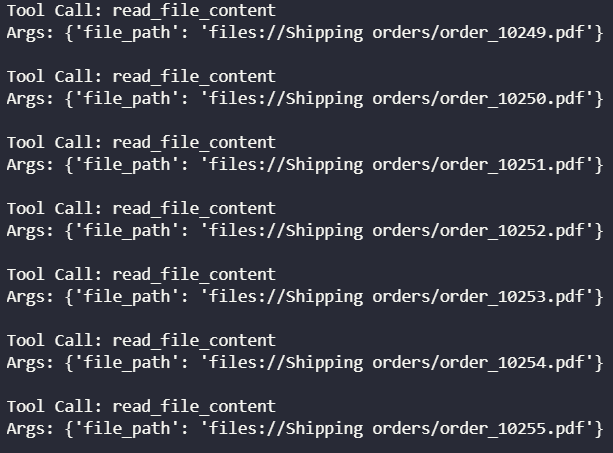
- read_file_content (resources) ทำหน้าที่หลักคืออ่านไฟล์และส่งข้อมูลให้กับ Server เพื่อส่งให้กับ Agent ทั้งนี้ความหมายของ Resources ก็คือฟังก์ชันสำหรับอ่านข้อมูลในขณะที่ Tools หมายถึงฟังก์ชันสำหรับลงมือทำและสร้างผลลัพธ์บางอย่าง
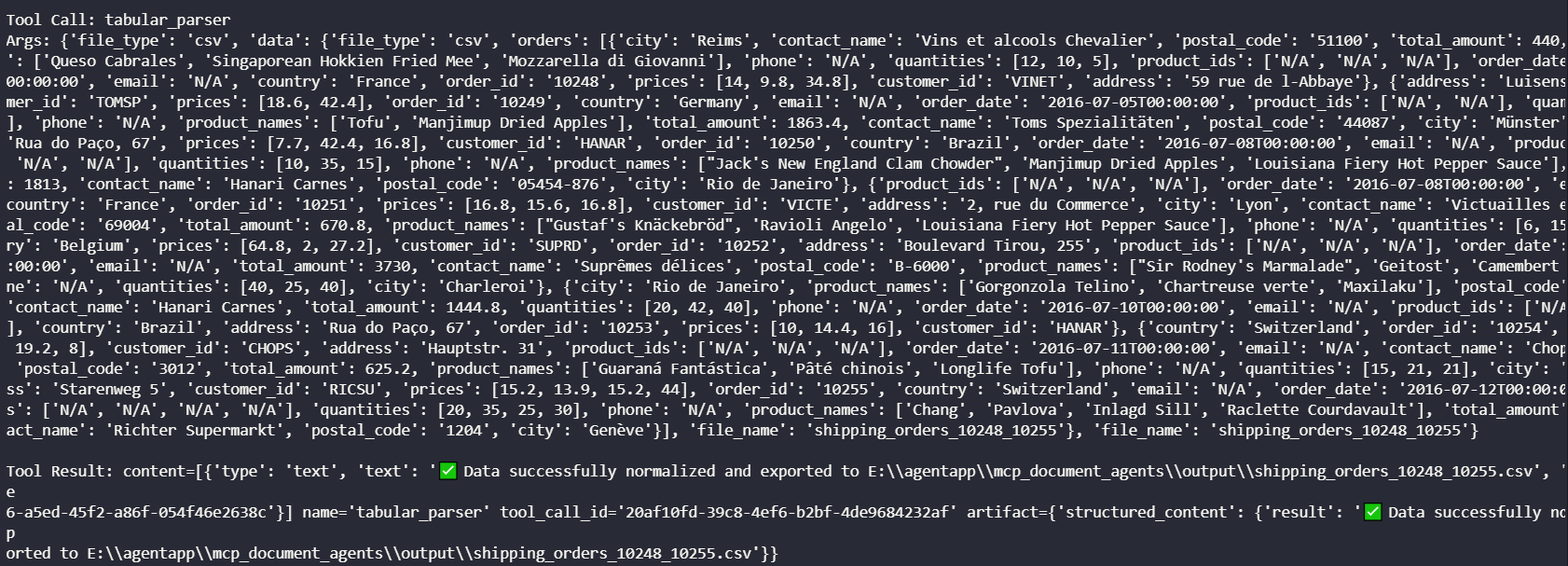
- tabular_parser ทำหน้าที่แปลงข้อมูลที่ได้มาจาก Resources เป็นรูปแบบตารางและสั่งบันทึกตามรูปแบบไฟล์ที่ผู้ใช้งานกำหนด ซึ่งรูปแบบของข้อมูลนั้นเราจะกำหนดด้วย Schema
- analyze_inventory_health ฟังก์ชันสำหรับวิเคราะห์ข้อมูลสต็อกสินค้าตรวจสอบว่าสินค้าไหนกำลังจะหมดและต้องเติมบ้าง
- analyze_shipping_efficiency ฟังก์ชันวิเคราะห์ประสิทธิภาพการจัดส่ง
- analyze_sales_performance ฟังก์ชันวิเคราะห์ประสิทธิภาพการขาย
Workflows
ขั้นตอนการทำงานในที่นี้เราจะไม่ได้กำหนดให้ Agent อย่างละเอียดมากนัก หากต้องการกำหนดอย่างละเอียดหรือเป็นระบบ Multi Agents เราจะพูดถึงในบทความถัด ๆ ไป ในโปรเจคนี้เราจะกำหนด System Prompt เริ่มต้นให้กับ Agent ไว้ดังนี้
"You are a professional data extraction assistant. And expert in analysis data from inventory, invoices, purchase order, and shipping order "
                    "You have 2 main roles "
                    "Role 1: Data Extractor when user asking for extract and save data "
                    "Your workflow is: "
                    "1. Searching incoming files in the folder given by user using search_files tool "
                    "2. Load and extract text using read_file_content tool "
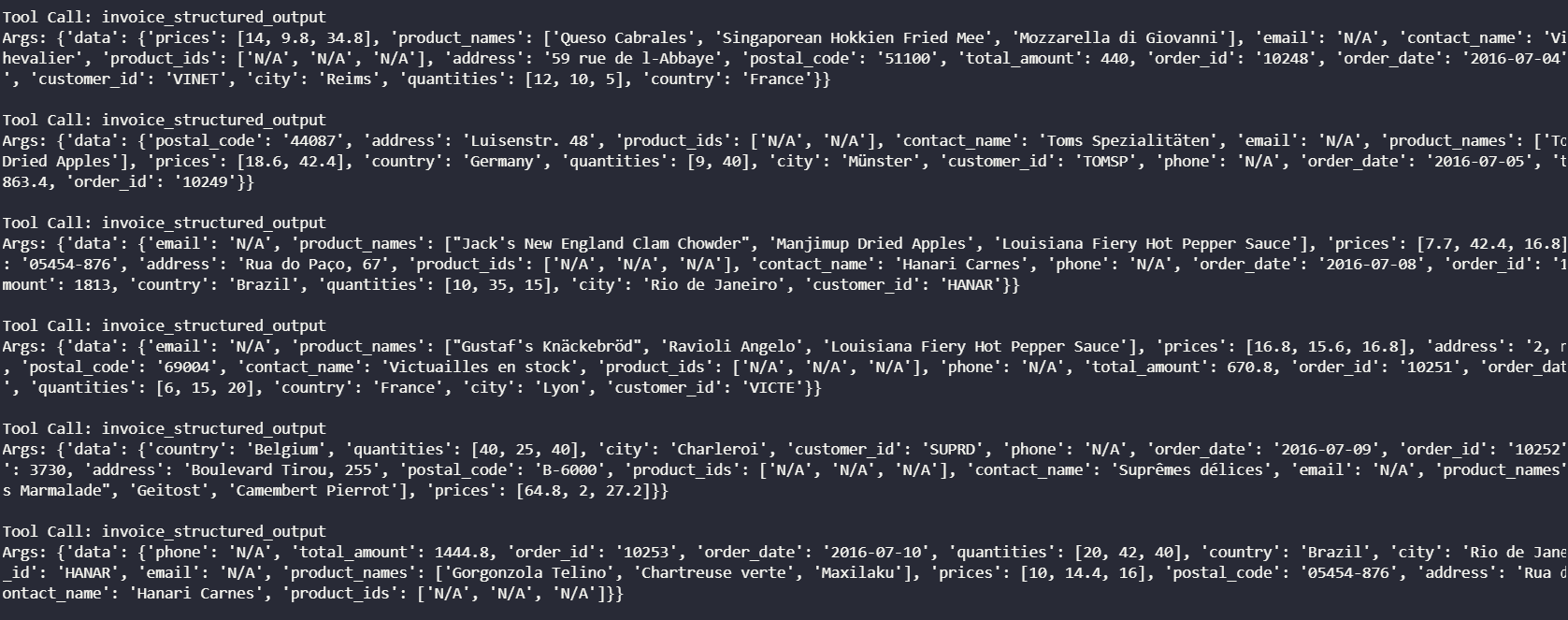
                    "3. Extract data from the text using invoice_structured_output or inventory_structured_output tool "
                    "4. Export data to tabular format using tabular_parser tool "
                    "5. return the final answer "
                    "Role 2: Data Analyzer when user asking for analysis data "
                    "Your workflow is: "
                    "1. Searching related files using search_files tool in the output folder "
                    "2. Load and extract text using read_file_content tool "
                    "3. Analyze data using analyze_inventory_health, analyze_shipping_efficiency, analyze_sales_performance tools upon related user query "
                    "4. return the final answer "
                    "You can also chat with user if user asking for something else "
หลัก ๆ เราจะให้ Agent ทำ 2 บทบาทคือ ตัวดึงข้อมูลและบันทึกข้อมูลในรูปแบบตาราง และ ตัววิเคราะห์ข้อมูลจากข้อมูลที่บันทึกไว้ กำหนดขั้นตอนหลัก ๆ คือการค้นหา การโหลดและดึงข้อมูล การทำ Structured Output และการสั่งบันทึก ส่งคำตอบสุดท้ายเป็นต้น
MCP Server
หลังจากที่เตรียมทุกอย่างเรียบร้อยแล้วนั้น โดยปกติก็จะสามารถใช้งาน Agent ได้แล้ว แต่ในกรณีนี้เราจะนำ MCP มาใช้เพื่อให้สามารถต่อยอดได้อย่างเป็นระบบในอนาคต
# server.py
from mcp.server.fastmcp import FastMCP

# 1. Import your tools from the separate files
from tools.file_search import search_files
from tools.file_reader import read_file_content
from tools.content_parser import invoice_structured_output, inventory_structured_output, tabular_parser
from tools.data_analysis import analyze_inventory_health, analyze_shipping_efficiency, analyze_sales_performance

# 2. Initialize the Server
mcp = FastMCP("Document Management Server")

# 3. Register the imported tools
mcp.add_tool(search_files)
mcp.add_tool(read_file_content)
mcp.add_tool(invoice_structured_output)
mcp.add_tool(inventory_structured_output)
mcp.add_tool(tabular_parser)
mcp.add_tool(analyze_inventory_health)
mcp.add_tool(analyze_shipping_efficiency)
mcp.add_tool(analyze_sales_performance)

# Optional: Add resource for direct file access if needed
@mcp.resource("files://{file_path}")
async def read_file_resource(file_path: str) -> str:
    return await read_file_content(file_path)

# 4. Run the server
if __name__ == "__main__":
    mcp.run()
การสร้าง Server ทำได้ไม่ยากเพียงแค่ประกาศสร้างด้วย FastMCP จากนั้นเพิ่ม Tool กับ Resource หรือ Prompt ที่ต้องการเข้าไปยังเซิฟเวอร์ได้เลย หากสั่งรัน Server ก็จะพบหน้าตาดังนี้
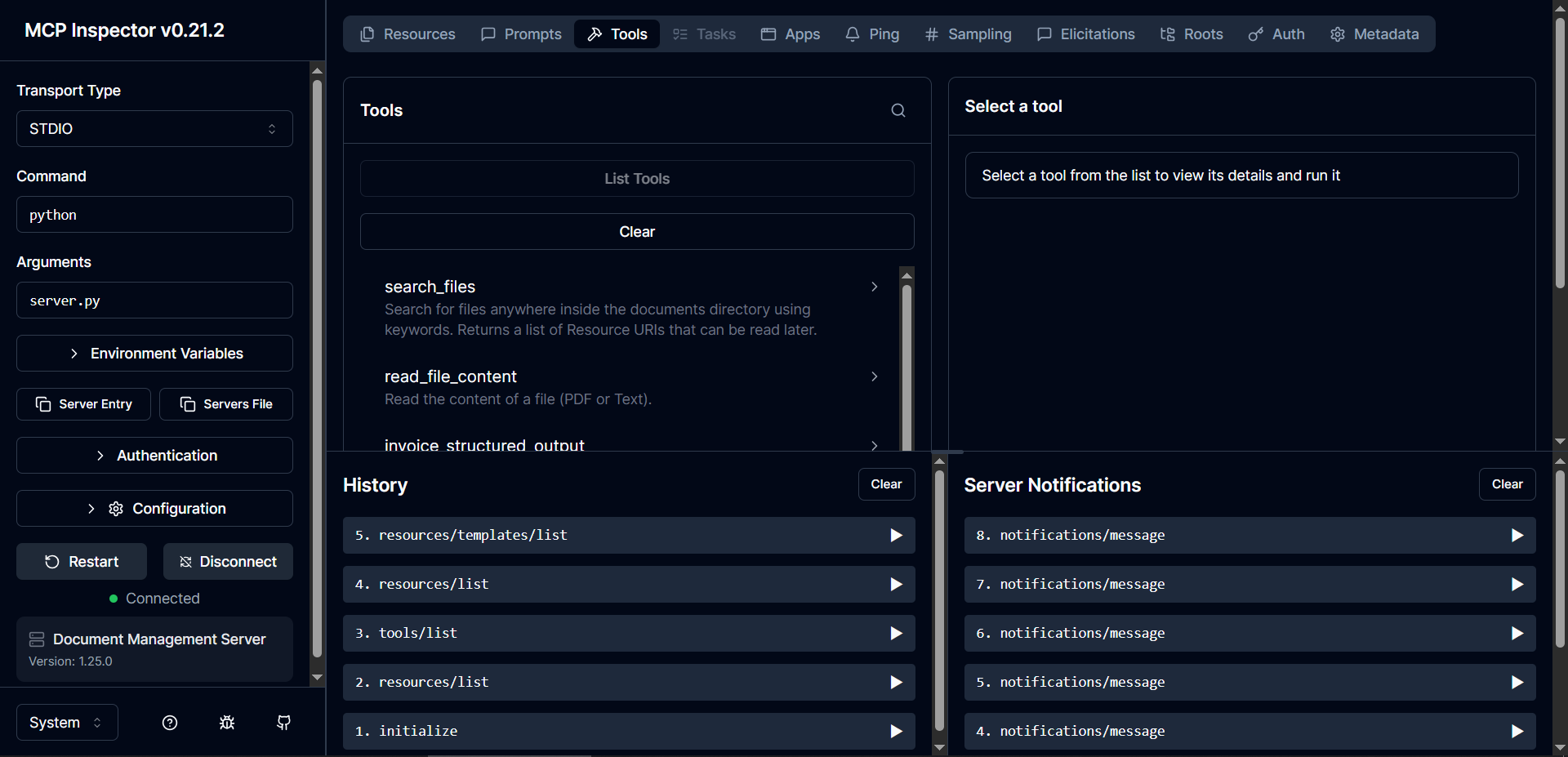
เราสามารถที่จะดู Tools, Prompts, Resources ที่มีได้รวมถึง Monitoring เรื่องต่าง ๆ ได้
MCP Client (Agent)
คือการนำ MCP Client มาครอบตัว Agent ของเราอีกทีนึง ซึ่ง Agent จะใช้ Langgraph, Langchain หรืออะไรก็ได้ ขอแค่มี Client ครอบเพื่อให้สามารถสื่อสารกับ MCP Server ได้ ในที่นี้ Client ของเราจะเป็น STDIO เพราะ Tools และของทุกอย่างที่เรามีนั้นอยู่บนเครื่อง Local ของเราเอง ถ้าหากว่าจะต้องข้ามเครื่องก็จะเปลี่ยนเป็น HTTP Client ได้ หรือใช้ผสมผสานกันก็ได้ (ในบทความถัดไปจะมาลองกัน)
import asyncio
from mcp import ClientSession, StdioServerParameters
from mcp.client.stdio import stdio_client
from langchain_mcp_adapters.tools import load_mcp_tools
from llm.models import get_chat_model
from langchain.agents import create_agent
from langchain.agents.middleware import wrap_tool_call
from langchain.messages import ToolMessage
from langgraph.checkpoint.memory import InMemorySaver
from data_models.schemas import PDFResponseFormat, Context, InvoiceResponseFormat
@wrap_tool_call
async def handle_tool_errors(request, handler):
"""Handle tool execution errors with custom messages."""
try:
return await handler(request)
except Exception as e:
# print(f"\n[DEBUG] TOOL ERROR: {type(e).__name__}: {str(e)}\n", flush=True)
# Return a custom error message to the model
return ToolMessage(
content=f"Tool error: Please check your input and try again. ({str(e)})",
tool_call_id=request.tool_call["id"]
)
async def run_agent():
llm = await get_chat_model("gemini")
import sys
server_params = StdioServerParameters(
command=sys.executable,
args=["server.py"],
env=None
)
print("Connecting to MCP Server...", flush=True)
async with stdio_client(server_params) as (read, write):
async with ClientSession(read, write) as session:
# Initialize the handshake
await session.initialize()
# 4. Magically fetch all tools from the server!
mcp_tools = await load_mcp_tools(session)
print(f"Loaded tools from server: {[tool.name for tool in mcp_tools]}", flush=True)
checkpointer = InMemorySaver()
config = {"configurable": {"thread_id": "1"}}
agent = create_agent(
model=llm,
tools=mcp_tools,
checkpointer=checkpointer,
system_prompt=(
"You are a professional data extraction assistant. And expert in analysis data from inventory, invoices, purchase order, and shipping order "
"You have 2 main roles "
"Role 1: Data Extractor when user asking for extract and save data "
"Your workflow is: "
"1. Searching incoming files in the folder given by user using search_files tool "
"2. Load and extract text using read_file_content tool "
"3. Extract data from the text using invoice_structured_output or inventory_structured_output tool "
"4. Export data to tabular format using tabular_parser tool "
"5. return the final answer "
"Role 2: Data Analyzer when user asking for analysis data "
"Your workflow is: "
"1. Searching related files using search_files tool in the output folder "
"2. Load and extract text using read_file_content tool "
"3. Analyze data using analyze_inventory_health, analyze_shipping_efficiency, analyze_sales_performance tools upon related user query "
"4. return the final answer "
"You can also chat with user if user asking for something else "
),
middleware=[handle_tool_errors],
name="Sales Data Agent"
)
print("\nAgent is ready! (Type 'quit' to exit)", flush=True)
while True:
user_input = input("\nYou: ")
if user_input.lower() in ["quit", "exit"]:
break
messages = {"messages": [{"role": "user", "content": user_input}]}
is_thinking = False
print("\n" + "="*20, flush=True)
async for event in agent.astream_events(
messages,
config=config,
version="v2",
context=Context(user_id="1")
):
kind = event["event"]
if kind == "on_chat_model_stream":
content = event["data"]["chunk"].content
metadata = event["data"]["chunk"].additional_kwargs
if "reasoning_content" in metadata:
print(f"{metadata['reasoning_content']}", end="", flush=True)
elif isinstance(content, str):
if "" in content:
is_thinking = True
print("[Thinking]: ", end="", flush=True)
content = content.replace("", "")
if " " in content:
is_thinking = False
content = content.replace(" ", "")
print(f"{content}\n", end="", flush=True)
continue
if is_thinking:
print(f"{content}", end="", flush=True)
else:
print(content, end="", flush=True)
elif kind == "on_chat_model_end":
output = event["data"]["output"]
if hasattr(output, 'tool_calls') and output.tool_calls:
for tool_call in output.tool_calls:
print(f"\nTool Call: {tool_call['name']}", flush=True)
print(f"Args: {tool_call['args']}", flush=True)
elif kind == "on_tool_end":
print(f"\nTool Result: {event['data'].get('output')}", flush=True)
final_state = await agent.aget_state(config)
if "messages" in final_state.values:
last_msg = final_state.values["messages"][-1]
if hasattr(last_msg, 'tool_calls') and last_msg.tool_calls:
for tool_call in last_msg.tool_calls:
if tool_call['name'] in [PDFResponseFormat.__name__, InvoiceResponseFormat.__name__, "structured_output", "final_answer"]:
print("\nFinal Structured Output:", flush=True)
print(f"Data: {tool_call['args']}", flush=True)
if __name__ == "__main__":
asyncio.run(run_agent())Conclusion
การนำ MCP มาใช้กับ AI Agent นั้นประโยชน์หลักคือเพื่อการสร้างมาตรฐานการรับส่งข้อมูลของ Agent กับ Environment ต่าง ๆ ไม่ว่าจะเป็นคอมพิวเตอร์ของเราเอง กับโปรแกรมอื่น กับระบบอื่นหรือกับ Agent ตัวอื่น ทั้งหมดเพื่อให้ Agent สื่อสารบนโปรโตคอลเดียวกัน มีวิธีการหยิบเครื่องมือ ทรัพยากร และทักษะ (Prompt) ไปใช้ในรูปแบบเดียวกัน ด้วยหลักการนี้ช่วยให้เราสามารถที่เพิ่มเครื่องมือ ข้อมูล คำสั่ง และจัดการได้อย่างมีประสิทธิภาพ